Guest portfolio
Tenant-scoped list sorted by visit count, last reservation date, and tier. Quick search and filters.

Guest CRM & Database
Reservation history, VIP tier, and tags in one profile. Your team recognizes guests before service.
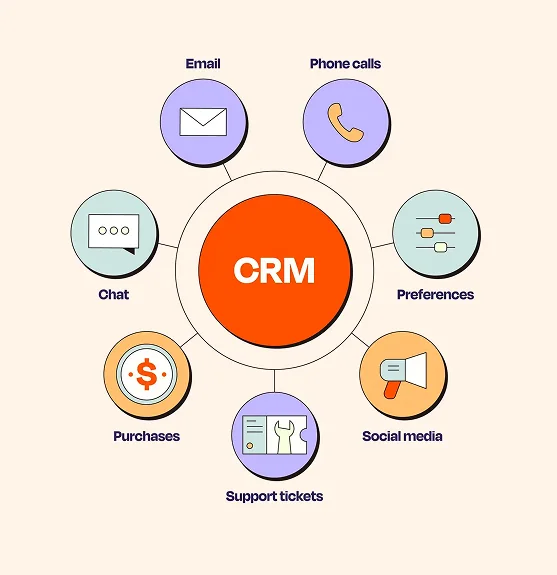
Tenant-scoped guest portfolio, VIP tiers, and tags. Marketing draws from the same data.
Profile, history, tier, and notes merge with the reservation flow. Tenant-scoped list shows only guests who booked at your venue.
Tenant-scoped list sorted by visit count, last reservation date, and tier. Quick search and filters.
Name, contact, allergy notes, preferences, and staff notes on one profile page. Open from reservation detail.
Assign standard, regular, or VIP tiers manually or by visit count. Tiers power marketing segmentation.
Group guests with custom tags: over $1,000 spend, high-spend VIP, special customer, campaign customer, and more.
See all past reservations, no-shows, and spend notes from the profile. Track repeat visit trends.
Privacy notice and commercial messaging consent dates stored on the profile. Non-opt-in guests stay off marketing lists.
Keep VIP preferences on file. Onboard new guests quickly. CRM data feeds the marketing opt-in list.
Allergy, preference, and VIP tier visible on reservation confirmation. Host and service teams arrive prepared.
Identify regular guests by visit count and last reservation date. Send targeted invites via the marketing module.
Guest data protected with tenant-scoped access. Privacy notice and IYS commercial messaging consent stored on the profile. Opt-out preferences exclude recipients.
Get started
Submit the form or request a callback and we will set up your venue profile together. No commission — guests book with you directly.
Connect your calendar, floor plan, and booking channels: website widget, Google Business Profile, and WhatsApp link. No-code embed — most venues go live the same day.
Go live with instant guest confirmations, team alerts, and automated reminders across SMS, email, and WhatsApp. Start accepting reservations around the clock.
From portfolio to history, tier to tags. Guest info stays accessible across operations.
Table sorted by visit count, tier, and last reservation. Search and filter to reach the right guest quickly.
Avatar, spend total, last visit, and tags in a horizontal profile strip. Open the full detail page in one click.
Bronze, Silver, and Gold tiers show guest counts by spend. Select a segment for campaign targeting.
Exportable guest list for a selected tag or segment. Recipient count visible before send.
All reservation history, no-shows, and spend notes in a chronological list for each guest.